


Get a Smart Meter: Find Your Energy Supplier in Londian
Introduction
In today’s fast-paced world, managing energy consumption efficiently is more important than ever. Smart meters are revolutionizing the way households and businesses track their electricity and gas usage, offering real-time data, accurate billing, and greater control over energy costs. If you’re a Londian resident or business owner, switching to a smart meter can simplify your energy management while contributing to a greener future. This guide will help you understand the benefits of smart meters, how to find your energy supplier in Londian, and the steps to get one installed.
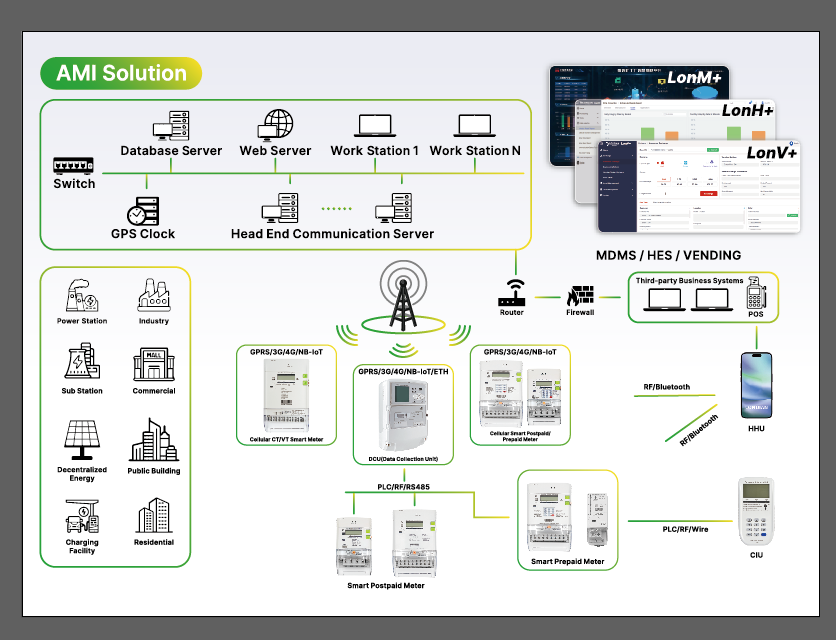
Why Should You Get a Smart Meter?
1. Accurate Billing – No More Estimates
Traditional meters rely on estimated readings, which can lead to overcharging or undercharging. Smart meters automatically send accurate usage data to your supplier, ensuring you only pay for what you consume.
2. Real-Time Energy Monitoring
Smart meters come with an in-home display (IHD) that shows your energy usage in real-time. This helps you identify high-consumption appliances and adjust habits to save money.
3. Contribute to a Sustainable Future
By optimizing energy use, smart meters reduce waste and lower carbon footprints. They support the transition to renewable energy by improving grid efficiency.
4. Hassle-Free Switching Between Suppliers
Unlike traditional meters, smart meters make switching suppliers easier. Many energy providers in Londian now support smart meter compatibility, ensuring a seamless transition.
5. No More Manual Meter Readings
Forget about submitting manual readings—smart meters automatically send data to your supplier, saving time and effort.
How to Find Your Energy Supplier in Londian
Before getting a smart meter, you need to confirm your current energy supplier. Here’s how:
1. Check Your Energy Bill
Your latest gas or electricity bill will display your supplier’s name, contact details, and account information.
2. Use the Meter Point Reference Number (MPRN/MPAN)
- MPRN (Gas): Found on your gas meter or bill.
- MPAN (Electricity): A 21-digit number on your electricity bill.
You can enter these numbers into the Energy Networks Association (ENA) database to identify your supplier.
3. Contact the Meter Number Helpline
If you’re unsure, call:
- Electricity: 0870 608 1524
- Gas: 0870 608 1524
4. Check Your Tenancy Agreement (For Renters)
If you rent your property, your landlord or letting agency may have details about your energy provider.
How to Get a Smart Meter Installed in Londian
Step 1: Contact Your Energy Supplier
Most major suppliers in Londian, including British Gas, EDF Energy, E.ON, Octopus Energy, and OVO, offer free smart meter installations.
Step 2: Book an Installation Appointment
Once you confirm eligibility, your supplier will schedule an installation. A certified technician will replace your old meter with a smart meter, typically within 1-2 hours.
Step 3: Set Up Your In-Home Display (IHD)
After installation, you’ll receive an IHD that shows real-time energy usage. Position it in a convenient location to monitor consumption.
Step 4: Start Tracking & Saving
Use the insights from your smart meter to adjust usage patterns, reduce waste, and lower bills.
Common Questions About Smart Meters in Londian
1. Are Smart Meters Free?
Yes, energy suppliers cover the cost as part of government-backed initiatives.
2. Will a Smart Meter Save Me Money?
Indirectly—by helping you track usage, you can identify savings opportunities.
3. Can I Switch Suppliers with a Smart Meter?
Yes, but ensure your new supplier supports the same type (SMETS1 or SMETS2).
4. Do Smart Meters Work During Power Outages?
No, but they automatically resume function once power is restored.
Závěr
Switching to a smart meter in Londian is a smart move for accurate billing, energy savings, and environmental benefits. By identifying your supplier and scheduling an installation, you can take control of your energy consumption effortlessly.
Ready to upgrade? Contact your energy provider today to book your smart meter installation!