


How to Read a Digital Electric Meter: A Comprehensive Guide for Londian Customers
Introduction
In today’s digitally driven world, understanding how to read your digital electric meter is essential for monitoring energy consumption, managing utility bills, and ensuring accurate billing. Unlike traditional analog meters, digital electric meters provide precise readings in an easy-to-read format. This guide by Londisch Company will walk you through the step-by-step process of reading different types of digital electric meters, interpreting the display, and troubleshooting common issues.
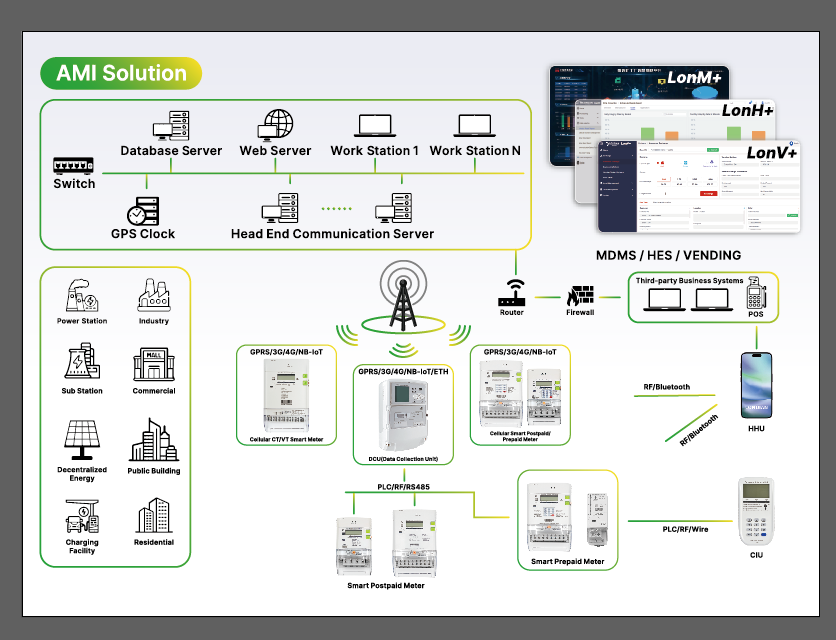
Why Is Reading Your Digital Electric Meter Important?
Before diving into the technical details, let’s explore why monitoring your digital electric meter matters:
- Billing Accuracy – Ensures you’re charged correctly based on actual usage.
- Energy Efficiency – Helps identify high consumption periods, allowing you to adjust usage habits.
- Fault Detection – Detects irregularities that may indicate meter malfunctions or power theft.
- Smart Home Integration – Many modern digital meters sync with smart home systems for real-time tracking.
Types of Digital Electric Meters
There are several types of digital electric meters, each with slight variations in display and functionality:
1. Single-Rate Digital Meters
- Displays total electricity consumption in kWh (kilowatt-hours).
- Common in residential properties without time-of-use pricing.
2. Two-Rate (Economy 7) Digital Meters
- Shows day and night rates separately.
- Used in homes with off-peak electricity tariffs.
3. Smart Meters
- Automatically sends readings to the utility provider.
- Often includes an in-home display (IHD) for real-time monitoring.
4. Prepayment Meters
- Requires topping up the credit before usage.
- Displays remaining balance and consumption rate.
Step-by-Step Guide to Reading a Digital Electric Meter
Step 1: Locate Your Meter
Digital electric meters are typically installed:
- Near the main electrical panel.
- Outside the house in a meter box (common in some regions).
- Inside a utility closet or basement.
Step 2: Identify the Display Type
Most digital meters cycle through different screens showing:
- Total kWh consumed (primary reading).
- Voltage and current (for advanced diagnostics).
- Time and date (in smart meters).
Step 3: Record the Reading
- Wait for the display to cycle to the kWh reading (may appear as “IMP kWh” for imported energy).
- Note the numbers from left to right, ignoring any red digits (which indicate decimal places).
Example:
If the display shows 12345.6 kWh, record 12345 as your meter reading.
Step 4: Check for Multiple Rates (If Applicable)
For two-rate meters, look for:
- R1 (Rate 1) – Daytime usage.
- R2 (Rate 2) – Nighttime or off-peak usage.
Step 5: Submit Your Reading (If Not Automated)
- Log in to your utility provider’s website or app.
- Enter the reading manually if your meter isn’t a smart meter.
Common Issues & Troubleshooting
1. Blank or Flickering Display
- Solution: Check power supply or contact your utility provider.
2. Error Codes (e.g., “Err” or “CLS”)
- Solution: Reset the meter by pressing the display button. If persistent, seek professional help.
3. Unusually High Readings
- Solution: Check for faulty appliances or unauthorized usage.
How Londian Company Can Help
Unter Londisch, we provide:
Smart meter installations for seamless energy tracking.
Energy audits to optimize consumption.
24/7 customer support for meter-related queries.
Schlussfolgerung
Reading a digital electric meter is simple once you understand the display format. Whether you have a single-rate, two-rate, or smart meter, tracking your usage helps in reducing costs and improving energy efficiency. For further assistance, contact Londian Company heute!